Vergogna Ipernity / Shame on you, Ipernity

Quando iniziai questo blog decisi di utilizzare Ipernity come servizio di hosting per le immagini: l'interfaccia era gradevole, il servizio gratuito e chiunque poteva scaricare le immagini nel formato che più gli piaceva. Nell'aprile del 2013 le condizioni di servizio sono cambiate all'improvviso e senza preavviso: nessuno può più scaricare immagini gratuitamente, neppure io. Il mio lavoro di anni è rimasto in possesso di Ipernity e le mie immagini sono ostaggio del loro sito: o pago o non posso né riprendermele né consentire ai visitatori di queste pagine di scaricarle. Sto, faticosamente, recuperando i file da fortunosi backup, facendo di nuovo le scansioni mancanti e sostituendo le immagini sui post; piano, piano tutto sarà sul mio Google Drive e di nuovo liberamente scaricabile.
Meditate, gente.


Visualizzazione post con etichetta 1988. Mostra tutti i post

mercoledì 19 agosto 2015

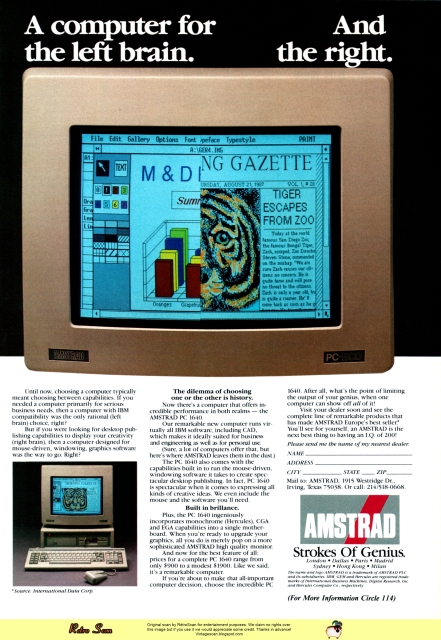
Amstrad PC 1640 (1988)


Un clic sull'immagine per visualizzarla (e scaricarla) nelle dimensioni originali
A computer for the left brain. And the right.
Until now, choosing a computer typically meant choosing between capabilities. If you needed a computer primarily for serious business needs, then a computer with IBM compatibility was the only rational (left brain) choice, right?
But if you were looking for desktop publishing capabilities to display your creativity (right brain), then a computer designed for mouse-driven, windowing, graphics software was the way to go. Right?
The dilemma of choosing
one or the other is history.

Now there’s a computer that offers incredible performance in both realms — the AMSTRAD PC 1640.
Our remarkable new computer runs virtually all IBM software, including CAD, which makes it ideally suited for business and engineering as well as for personal use.
(Sure, a lot of computers offer that, but here’s where AMSTRAD leaves them in the dust.)
The PC 1640 also comes with the capabilities built in to run the mouse-driven, windowing software it takes to create spectacular desktop publishing. In fact, PC 1640 is spectacular when it comes to expressing all kinds of creative ideas. We even include the mouse and the software you’ll need.
Built in brillance.
Plus, the PC 1640 ingeniously incorporates monochrome (Hercules), CGA and EGA capabilities into a single motherboard. When you’re ready to upgrade your graphics, all you do is merely pop on a more sophisticated AMSTRAD high quality monitor.
And now for the best feature of all: prices for a complete PC 1640 range from only $900 to a modest S1900. Like we said, it’s a remarkable computer.
If you’re about to make that all-important computer decision, choose the incredible PC 1640. After all, what’s the point of limiting the output of your genius, when one computer can show off all of it!
Visit your dealer soon and see the complete line of remarkable products that has made AMSTRAD Europe’s best seller. You’ll see for yourself, an AMSTRAD is the next best thing to having an I.Q. of 200!
Cioè:
Un computer per il lobo sinistro. E per il destro.
Fino ad ora, la scelta di un computer di solito significava scegliere tra capacità. Se avevate bisogno di un computer principalmente per serie esigenze di lavoro, allora un computer con compatibilità IBM era la sola scelta razionale (emisfero sinistro), giusto?
Ma se stavate cercando le funzionalità di desktop publishing per mostrare la vostra creatività (emisfero destro), quindi un computer progettato per software di grafica, a finestre, gestito on un mouse era la strada da percorrere. Giusto?
Il dilemma di scegliere
uno o l'altro è storia.

Ora c'è un computer che offre prestazioni incredibili in entrambi i MONDI - il  PC 1640 di AMSTRAD.
Il nostro nuovo straordinario computer esegue praticamente tutto il software IBM, tra cui il CAD, il che lo rende ideale per le aziende e gli ingegneri, nonché per uso personale.
(Certo, molti computer offrono la stessa cosa, ma qui è dove AMSTRAD li lascia nella polvere.)
Il PC 1640 viene fornito con le funzionalità integrate per eseguire il software a finestre gestito dal mouse che servee per creare spettacolari pubblicazioni computerizate. Infatti, il PC 1640 è spettacolare quando si tratta di esprimere tutti i tipi di idee creative. E abbiamo incluso il mouse e il software di cui avete bisogno.
Costruito splendidamente.
Inoltre, il PC 1640 incorpora ingegnosamente le caratteristiche monocromatiche (Ercole), CGA ed  EGA in un'unica scheda madre. Quando si è pronti per aggiornare la grafica, tutto ciò che c'è da fareè solo collegare un  monitor di alta qualità AMSTRAD più sofisticato.
E ora per la caratteristica migliore di tutte: i prezzi per un PC 1640 completo vanno da soli 900$ ad appena 1900$. Come abbiamo detto, si tratta di un computer notevole.
E se state per prendere la decisione fondamentale su quale computer, scegliete l'incredibile PC 1640. Dopo tutto, per quale motivo di limitare l'espressione del vostro genio, quando un computer può farvelo sfoggiare tutto!
Visitate quanto prima il vostro rivenditore e gurdate la linea completa di prodotti straordinari che ha fatto di di AMSTRAD il più venduto Europa. Vedrete voi stessi, un AMSTRAD è la cosa migliore dopo avere un Q. I.  di 200!

domenica 22 marzo 2015

Logitech HiREZ Mouse (1988)


Un clic sull'immagine per visualizzarla (e scaricarla) nelle dimensioni originali
Introducing the most agile mouse ever to set foot on a desktop.

The LOGITECH HiREZ Mouse — the only mouse expressly designed for high-resolution screens.
With a resolution of 320 dots-per-inch (as compared with 200 dpi or less for ordinary mice), it covers the same area on your high-res screen, but needs less of your desk to do it. More than 50% less. Saving you valuable desk space, and effort: mouse maneuvers that used to require a sweep of the hand are now reduced to a flick of the wrist.
Which makes this new mouse a hand’s best friend. And a more reliable, long-lasting companion—fully compatible with all popular software, and equipped with a Lifetime Guarantee.
Equipped, too,with other advantages exclusive to all Logitech mice: A unique lightweight ergonomic design. Low- angled buttons for maximum comfort and minimum fatigue. An exclusive technology that guarantees a much greater life span. An exceptionally smooth-moving, dirt-resistant roller ball. And natural compatibility with all PCs, look-a-likes, and virtually any software.
So if you’ve got your eyes on a high-res screen, get your hands on the one mouse that’s agile enough to keep up with it.
The LOGITECH HiREZ Mouse.
Cioè:
Vi presentiamo il mouse più agile che abbia mai messo piede su una scrivania.

Il Mouse LOGITECH HiREZ — l'unico mouse progettato espressamente per schermi ad alta risoluzione.
Con una risoluzione di 320 punti per pollice (rispetto ai 200 ppp o meno per i mouse normali) copre la stessa area sullo schermo ad alta risoluzione ma ha bisogno di meno scrivania per farlo. Più del 50% in meno. Risparmiando spazio prezioso sulla scrivania e fatica: le manovre con il mouse che richiedevano un gesto ampio della mano si riducono adesso a un colpetto del polso.
Il che rende questo nuovo mouse il miglior amico della vostra mano. E un compagno più affidabile e duraturo—compatibile completamente con tutti i programmi più diffusi e dotato di una Garanzia a Vita. Fornito, inoltre, di altri vantaggi esclusivi di tutti i mouse Logitech: una forma leggera ed ergonomica unica. I pulsanti poco inclinati per la massima comodità e il minimo affaticamento. Una tecnologia esclusiva che garantisce una maggior durata di vita. Un movimento eccezionalmente liscio, una pallina di rotolamento resistente allo sporco. E la naturale compatibilità con tutti i PC e simili e virtualmente qualsiasi programma.
Quindi, se tenete gli occhi su uno schermo ad alta risoluzione, mettete le mani sull'unico mouse che è abbastanza agile da tenergli il passo.
Il mouse LOGITECH HiREZ.

mercoledì 17 settembre 2014

NEC PowerMate Portable (1988)


Un clic sull'immagine per visualizzarla (e scaricarla) nelle dimensioni originali

THE DESKTOP COMPUTER FOR PEOPLE WHOSE MINDS ARE AT WORK EVEN WHEN THEIR BODIES AREN'T.
Presenting the PowerMate Portable™. Desktop power to go™.
If you happen to be one of those rare individuals whose minds don't punch out at fiveve o'clock, we have some good news for you.
It’s called the PowerMate Portable. And thanks to some workaholic engineers at NEC, this nifty little dynamo is everything a desktop computer is.
Plus it's portable. Which means you can use it anywhere. At work. At home. Or on the road. It boggles the mind.
And speaking of mind boggling, check out what’s under the hood: Intel 80286™ technology, full-size internal AT-compatible expansion slots, an optional internal modem, 20 or 40 MB hard disk and EGA resolution on a backlit LCD display. Call 1-800-343-4418 and find out more about PowerMate Portable from NEC. The quick pick-me-up for the “Thank Goodness it’s Monday” crowd.
Cioè:
IL COMPUTER DA SCRIVANIA PER LE PERSONE CHE HANNO LE MENTI IN FUNZIONE ANCHE QUANDO NON LO SONO I LORO CORPI.
Vi presentiamo il Portatile PowerMate. Potenza da desktop per muoversi.
Se siete uno di quei rari individui la cui mente non timbra l'uscita alle cinque, abbiamo una buona notizia per voi.
Si chiama PowerMate Portable. E grazie ad alcuni ingegneri alla NEC drogati di lavoro, questa graziosa piccola dinamo è tutto quello che può essere un computer da scrivania.
Inoltre è portatile. Il che significa che si può usare ovunque. A lavoro. A casa. O per strada. È sconvolgente.
E parlando di sconvolgente, guardate cosa c'è dentro: la tecnologia Intel 80286™, slot di espansione a misura intera compatibili AT, un modem interno opzionale, un hard disk da 20 o da 40 MB e la risoluzione EGA per un display LCD retroilluminato. Chiamate il 1-800-343-4418 e scoprite di più sul PowerMate Portable della NEC. Il 'pronto' portami-con-te per la folla di quelli che "Grazie a Dio è Lunedì".

domenica 7 settembre 2014

Olivetti M380 (1988)


Un clic sull'immagine per visualizzarla (e scaricarla) nelle dimensioni originali
NEW M380 LINE: NOW MORE THAN EVER THE SPEED AND POWER TO GROW WITH YOU.
Advances in the important 80386 sector have prompted a huge upsurge in consumer demand for 386-based machines. And, to keep you up to date with these advances, Olivetti introduces a new M380 line.
The new line is the fastest on the market today and more powerful XP (extra performance) models are introduced at the top end. At the top of the new line is the M380/ XP5 floor-standing PC. It has a clock speed of 20 MHz. Hard disk options range up to 300 MB. The XP5 also offers the new graphic subsystem OVC (VGA-compatible). The new M380/XP3 has 2 MB RAM and a clock speed of 20 MHz, plus a 135 MB hard disk unit. It too has the OVC graphic subsystem as part of the standard configuration.
The new M380/XP1 compact desktop PC has an 80 MB HDU. With a clock speed of 20 MHz, it offers 1 MB RAM and OVC graphic subsystem as standard. The new M380/C has an improved HDU capacity of 63 MB, OVC graphic subsystem and a clock speed of 16 MHz. All M380 models operate in a MS-DOS, XENIX/V and MS OS/2 environments. And all include the WINDOWS 386 package to meet all current and future applications.
The new M380 line. Yet another way in which Olivetti is honouring its commitment to bring you the choice of freedom.

MS-DOS, XENIX/V, OS/2 and MS-Windows are registered trademarks of Microsoft Corporation.

OLIVETTI PERSONAL COMPUTERS.
CHOICE OF FREEDOM.
Cioè:
NUOVA LINEA M380: ORA PIÙ CHE MAI LA VELOCITÀ E LA POTENZA PER CRESCERE CON VOI.
I progressi nell'importante settore degli 80386 hanno creato un aumento delle richieste degli utenti per macchine basate su 386. Per tenervi aggiornati con questi progressi, Olivetti vi presenta la nuova linea M380.
La nuova linea è oggi la più veloce sul mercato e al suo vertice vi presentiamo i più potenti modelli XP (extra performance). In cima alla nuova linea c'è l'M380/XP5, un PC da pavimento. Ha una velocità di clock di 20 MHz. Le opzioni per l'hard disk arrivano fino a 300 MB. L'XP5 è dotato anche della nuova grafica OVG (compatibile VGA). Il nuovo M380/XP3 ha 2 MB di RAM e una velocità di clock di 20 MHz oltre a un'unità hard disk da 135 MB. Anch'esso è dotato di grafica OVG come configurazione standard.
Il nuovo PC compatto da scrivania M380/XP1 ha un HDU da 80 MB. Con una velocità di clock di 20 MHz, vi offre come standard 1 MB di RAM e il sottosistema grafico OVC. Il nuovo M380/C ha una capacità di HDU migliorata a 63 MB, sottosistema grafico OVC e una velocità di clock di 16 MHz. Tutti i modelli M380 operano in ambienti MS-DOS, XENIX/V ed MS OS/2. E in tutti è incluso il pacchetto WINDOWS 386 per venire incontro alle applicazioni di oggi e del futuro.
La nuova linea M380. Ancora un modo in cui Olivetti onora il suo impegno di mettervi a disposizione la scelta della libertà.

MS-DOS, XENIX/V, OS/2 ed MS-Windows sono marchi di fabbrica depositati di Microsoft Corporation.

PERSONAL COMPUTER OLIVETTI.
SCELTA DI LIBERTÀ.

mercoledì 3 settembre 2014

Tandy 5000 MC (1988)


Un clic sull'immagine per visualizzarla (e scaricarla) nelle dimensioni originali

Tandy Computers: Because there is no better value.™
The New Tandy® 5000 MC
Our most powerful 80386 based computer... made in America.
MC Professional System is strictly business, from the look of its 256,000-color VGA graphics to the tactile feel of its keyboard.
Inside is pure performance, from the 80386 processor operating at 20 MHz to the fast memory with cache that provides RAM-fast access to your data.
The 5000 MC comes with a built-in 1.44MB 3½" floppy drive. There's room inside for a second 3½" drive (or hard drive) and two 5¼" floppy, hard or tape drives. Choose from ST506 or ESDI — and SCSI support is coming.
Add a 20-MHz 80387 math coprocessor. Expand the memory to 16MB using two dedicated expansion slots, and you can still add up to five IBM® Micro Channel compatible expansion adapters.
And with its high-speed performance, the 5000 MC is a natural as the hub of a multiuser system or as a file server in a 3Com® office workgroup.
A Tandy 5000 MC with an 84MB hard disk drive is only $6999. Check out the new altemative in personal computing.

• 20 MHz Intel® 80386 microprocessor
• 2MB RAM, expandable to 16MB
• Intel 82385 Memory Cache controller
• Built-in VGA graphics, as well as MCGA, CGA, and EGA
• Displays 256 colors, 64 shades of gray
• Five IBM Micro Channel™ expansion slots, plus two dedicated memory slots
• Built-in 1.44 MB 3½" disk drive plus three front-panel device slots
• High-speed/high-capacity disk options
• 80387 co-processor socket
• Supports MS·DOS®, MS® OS/2 and multiuser SCO® XENIX® operating systems

Cioè:


Computer Tandy: perché non c'è valore migliore.™
Il nuovo Tandy® 5000 MC
Il nostro più potente computer basato su un 80386... fatto in America.
Il Sistema MC Professional è rigorosamente aziendale, per l'aspetto della grafica VGA a 256.000 colori, per l'effetto tattile della tastiera.
All'interno è prestazione pura, dal processore 80386 che opera a 20 MHz alla memoria veloce con la cache che fornisce un accesso ai vostri dati alla velocità della RAM.
Il 5000 MC viene fornito di serie con un floppy drive di  3½" da 1.44MB. All'interno c'è spazio per un secondo drive (o un hard drive) da 3½" e due floppy da 5¼", hard drive o sistemi a nastro. Scegliendo tra ST506 o ESDI — e tra poco il supporto SCSI.
Aggiungete un coprocessore matematico 80387 a 20 MHz. Espandete la memoria a 16 MB usando due slot di espansione dedicati e potrete inserire ancora fino a cinque ulteriori adattatori di espansione compatibili con IBM® Micro Channel.
E con le sue prestazioni di alta velocità, il 5000 MC è adatto come punto centrale di un sistema multiutente o come file server di un office wokgroup di 3Com®.
Un 5000 MC fornito di un hard disk da 84 Mb costa solo $6999. Controllate la nuova alternativa nel mondo dei personal computer.

• Microprocessore 80386 Intel® a 20 MHz Intel®
• 2 MB RAM, espandibile a 16 MB
• Memory Cache controller 82385 di Intel
• Grafiche VGA, MCGA, CGA ed EGA fornite di serie
• Display a 256 colori, 64 tonalità di grigio
• Cinque slot di espansione IBM Micro Channel™, oltre a due slot di memoria dedicati
• Disk drive da 1.44 MB 3½" di serie oltre a tre slot per dispositivi nel pannello frontale
• Opzioni per dischi ad alta velocità e super capacità
• Socket per coprocessore 80387
• Supporta i sistemi operativi MS·DOS®, MS® OS/2 e il multi-utente SCO® XENIX®


martedì 1 luglio 2014

AST Premium 386 (1988)


https://drive.google.com/file/d/0B-I-2gftBN19bUE1UHpkMDNFNDg/edit?usp=sharing

Un clic sull'immagine per visualizzarla (e scaricarla) nelle dimensioni originali

Ultimate power. Ultimate Confidence. Ultimate Freedom.
The sky's the limit. That's how you might describe the power-packed capabilities of the AST Premium™/386 ...and how far we'll go to provide outstanding products, service and support.
Only the 20 MHz, Premium/386, with its advanced bus technology (SMARTslot™) and uncompromising compatibility eliminates the traditional restrictions placed on an AT®'s performance and speed while providing future upgradeability.
You also get the comfort that comes from choosing a company with a solid worldwide reputation for reliable, high-quality technology.
So while others are caught up in compatibility and support problems, you're completely free to enjoy the highest AT-compatible '386 system performance available today. . .and take advantage of performance-oriented upgrades in the future using SMARTslot architecture.
And because of our many years of working with key leaders in the industry we're able to maximize the capabilities of the most advanced operating systems and application software available, including MS® OS/2 from AST, IBM®’s OS/2™, UNIXI™, Windows™ 386 and MS-DOS®. 
Cioè:
Potenza assoluta. Fiducia assoluta. Libertà assoluta.
Il cielo è il limite. Ecco come si potrebbero descrivere le funzionalità del potente AST Premium™/386 ... e quanto andremo lontano nel fornire prodotti, servizio e supporto eccezionali.
Solo il Premium/386, a 20 MHz, con la sua tecnologia avanzata del bus (SmartSlot™) e una compatibilità senza compromessi elimina le tradizionali restrizioni sul rendimento e sulla velocità di un AT®, fornendo aggiornabilità nel futuro.
E avrete anche la comodità che deriva dalla scelta di una società con una solida reputazione a livello mondiale per affidabilità e tecnologia di alta qualità.
Così, mentre altri sono coinvolti in problemi di compatibilità e supporto, voi siete completamente liberi di godere delle più alte prestazioni di un sistema 386 AT-compatibile disponibili oggi... e di approfittare di aggiornamenti nelle prestazioni future con l'architettura SMARTSlot.
E per via dei nostri molti anni di lavoro con i maggiori leader nel settore siamo in grado di massimizzare le capacità dei più avanzati sistemi operativi e software applicativi disponibili, tra cui MS® OS/2 di AST, IBM® OS/2™ , UNIX™, Windows™ 386 e MS-DOS®.

domenica 10 marzo 2013

Carbon Copy Plus (1988)


Carbon Copy Plus

Un clic sull'immagine per visualizzarla (e scaricarla) nelle dimensioni originali

Double Your Productivity With Carbon Copy Plus
Carbon Copy Plus - the industry standard in remote control software — easily lets two PCs share the same application over ordinary phone lines.
So now you can share the same keyboard, screen and disk with a remote user thousands of miles away allowing you to give effective product demonstrations, support remote customers or train new users — without ever having to leave your office!
Remote control and much more! 
Of course, Carbon Copy Plus offers other advanced remote communications features including remote printing, remote access to a local area network and remote session capture and playback. But Carbon Copy Plus also offers many of the same features found in "standard" communications programs, such as file transfer, terminal emulation and complete scripting macros. And much more!
Introducing Version 5.0 
If you thought Carbon Copy Plus was powerful before - wait until you see the new Version 5.0. Carbon Copy Plus has always been able to transmit text or graphics, but now our new universal graphics translator merge incompatible graphics formats. So you can jointly update a CAD diagram using your CGA. BGA. VGA or MCSA system wiht an associate who is using the Hercules standard.
Just as important is our new background file transfer capability. This lets you easily send or receive files, at any time, without exiting your current application. Now you can double your productivity by working on one spreadsheet file while an associate sends you another!
Twice as easy
Find out why Carbon Copy Plus has become the industry standard in remote communications and is fast becoming one of the most popular communications programs overall. Call us today. We'll show you how easily you can increase your productivity.
Cioè:
Raddoppia la Tua Produttività Con Carbon Copy Plus
Carbon Copy plus - lo standard industriale nel software di controllo remoto - permette a due PC di condividere la stessa aplicazione tramite la normale rete telefonica.
Così adesso potete condivitere tastiera, video e disco con un utente remoto a migliaia di chilometri di distanza, realizzando presentazioni efficaci, dando supporto a utenti remoti o istruendo nuovi utenti - senza neppure dover lasciare l'ufficio!

Controllo remoto e molto di più!
Ovviamente Carbon Copy Plus offre altre avanzate caratteristiche nella comunicazione remota, come la stampa remota, l'accesso remoto alla rete locale e la registrazione della sessione remota con possibilità di rivederla. Ma Carbon Copy Plus offre anche molte delle caratteristiche che si trovano nei programmi "standard" di comunicazione, come il trasferimento di file, l'emulazione di un terminale e una completa serie di macro. E molto altro ancora!

Vi presentiamo la versione 5.0
Se pensavate che Carbon Copy Plus fosse già potente - aspettate di vedere la versione 5.0. Carbon Copy Plus ha sempre avuto la capacit di trasmettere testo e grafica ma adesso il nostro nuovo traduttore grafico universale miscela formati grafici incompatibili. Così potrete aggiornare insieme un diagramma CAD usando la vostra grafica CGA, BGA, VGA o MCSA con un collaboratore che sta usando uno standard Hercules.
Altrettanto importante è la nuova capacità di trasferire file in background. Questa vi consente di mandare o ricevere file, in qualsasi momento, senza uscire dall'applicazione che state usando. Potete adesso raddoppiare la vostra produttività lavorando su un foglio elettronico mentre un colaboratore ve ne invia un altro!

Due volte più semplice
Scoprite perché Carbon Copy Plus è diventato lo standard industriale nella comunicazione remota e sta diventando uno dei programmi di comunicazione più popolari. Chiamateci oggi. Vi mostreremo come potrete facilmente aumentare la vostra produttività.

martedì 14 agosto 2012

Mitsubishi diskette (1988)


Mitsubishi diskettes (1988)
Mitsubishi's diskettes reign supreme in any market, for they are the very best available!
Wonders have been created in the field of magnetic recording.
A newly developed 3.5-inch high-density micro floppy disks to satisfy every business' most demanding needs. The MF-2HD by Mitsubishi is highly durable and equipped with a three-dimensional binder system. Furthermore, the new disk supporting structure enhances head-to-disk contact no end. lt is compact but possesses outstanding features. The double sided disk allow amazing memory capacity of 2 mega-bytes and has an automatic shutter, a hard shell, a thin coating, a slide-on write protect tab and top-level reliability guaranteed to be 100 percent error-free. This is yet another breakthrough in the already advanced field of diskette technology . 
 I dischetti della Mitsubishi regnano sulla vetta di ogni mercato perché sono in assoluto i migliori disponibili! Nel campo delle registrazioni magnetiche sono state fatte meraviglie. Un micro floppy disk da 3.5", appena sviluppato, con alta densità, per soddisfare le necessità più esigenti. Il MF-2HD di Mitsubishi ha una lunga durata ed è dotato di un sistema di contenimento tridimensionale. Inoltre la nuova struttura di supporto del disco migliora moltissimo il contatto tra disco e testina. E' compatto ma ha caratteristiche straordinarie. Il disco a doppia faccia permette l'incredibile capacità di 2 mega-bytes ed ha un otturatore automatico, una struttura rigida, un rivestimento sottile, un linguetta a scorrimento per la protezione da scrittura ed una eccezionale affidabilità garantita al 100 per cento priva di errore. Questa è un'altra svolta nel campo già avanzato della tecnologia dei dischetti. 

domenica 10 giugno 2012

Excel (1988)


Excel (1988)

Successore, in casa Microsoft, del glorioso foglio di calcolo Multiplan, nato trenta anni fa, nel 1988 Microsoft con Excel era pronta a sorpassare il diffusissimo Lotus 1-2-3 che, con l'avvento di Windows, rimase commercialmente al palo.
Nella foto a sinistra, in primo piano l'inconfondibile schermo al plasma del Compaq Portable 386 dalla classica forma a 'lunch-box'.

Il testo dice:
The computer world was different five years ago. Chances are your business was, too.
Software was limited by the limits of the old machines. Your work was limited by the limits of your software.
Enter Microsoft Excel.
It makes the new machines perform. With features that get the most from today’s high-speed processors and high-resolution screens.
The new-generation spreadsheet.
For the new-generation machines.
Display worksheets and charts together. View and link them in an intuitive, commonsense way.
Then check your work with an array of built-in auditing tools.
Show exactly what those numbers mean with annual-report—quality spreadsheets. Add emphasis with typefaces, borders, and shading. Create vivid charts with just one keystroke. And produce stunning printouts.
You don’t have to give up your old software. Microsoft Excel lets you load and save Lotus 1-2-3 files. Convert old macros. Record new ones.
You’ll be ready for tomorrow’s software, too. Because Microsoft Excel has the same look and feel as OS/2 Presentation Manager from IBM and Microsoft.
Take a visible leap forward in spreadsheet power, capability, and convenience. And see the visible improvement it brings to your bottom line.
You’ve read the ad. Now see the movie.
Now you can preview Microsoft Excel. In a brand—new video that shows it in action.
It’s dramatic. It’s humorous. And it’s free.
Call for your copy today: (800) 323-3577 ext. C84
Ask for the Microsoft Excel video. Or visit your local Microsoft dealer.
Find out why we’re backing every copy of Microsoft Excel with a money-back guarantee.
See what our soul can do for your machine.
Cioè:

Il mondo del computer cinque anni fa era diverso. E probabilmente lo era anche la vostra attività.
Il software era limitato dai limiti delle vecchie macchine. La vostra attività era limitata dai limiti del software.
Entrate in Excel di Microsoft.
Fa rendere le nuove macchine. Con caratteristiche che ottengono il meglio dagli odierni processori ad alta velocità e dai video ad alta risoluzione.
La nuova generazione di fogli elettronici. Per la nuova generazione di macchine.
Mostrate contemporaneamente fogli di lavoro e grafici. Visualizzateli e collegateli in modo intuitivo e semplice. Poi controllate il lavoro con un insieme di strumenti di verfica compresi nel software.
Mostrate esattamente cosa vogliono dire quei numeri con fogli degni della qualità delle relazioni di chiusura d'anno. Mettete in evidenza usando caratteri tipografici, bordi e ombreggiatura. Create grafici vivaci con l'uso di un solo tasto. E generate stampe stupefacenti.
Non dovete abbandonare il vostro vecchio software. Excel di Microsoft vi permette di caricare e salvare i file di Lotus 1-2-3. Di convertire le vecchie macro. Di registrarne di nuove.
E sarete anche pronti per il software di domani. Perché Excel di microsoft ha lo stesso aspetto del Presentation manager di OS/2 di IBM e Microsoft.
Fate un netto passo avanti in potenza, capacità e convenienza. E guardate il miglioramento visibile che porta al cuore della vostra attività.
Avete letto la pubblicità, adesso guardate il film
Ora potete vedere l'anteprima di Excel di Microsoft. In un video nuovo di zecca che lo mostra in azione.
E' drammatico. E' divertente. Ed è gratis.

martedì 1 maggio 2012

Toshiba T3200 (1988)


Un clic sull'immagine per visualizzarla (e scaricarla) nelle dimensioni originali

Le poche volte che l'ho portato in giro, proprio appena uscì in Italia, (1988 o 1989) coi suoi dieci chili mi ci sono indolenzito le spalle ma dei portatili Toshiba ho un ottimo ricordo, per la qualità e le prestazioni; nel mio lavoro i laptop, di lì a qualche anno, avrebbero definitivamente sostituito quegli ingombranti cassoni rumorosi e aspira-polvere dei desktop.

Il testo dice:
When the eagerly awaited PC first hit the desks of the public, everyone figured it was there to stay. It was, after all, powerful and functional. And considering it weighed about 40 lbs., it would take a lot to unseat it.
Introducing a lot. The new Toshiba T3200.
In a sleek 18.7 lb. package, the T3200 acts like no other portable, or overweight desktop PC AT, for that matter.
With its two internal expansion slots, you can connect to a LAN, a mainframe, or add peripherals.
It also has a 12 MHz 80286 microprocessor, a 40MB hard disk, and a 720 KB 3 1/2" diskette drive.
And when it comes to memory, the T3200 rivals your clunky desktop. With its 1 MB RAM that expands to 4MB. We even gave it a built-in, gas plasma EGA display and monitor port. Which, by the way, are optional on your old desktop.
All of which means you should call 1-800-457-7777 for your nearest Toshiba computer and printer dealer.
And ask to see the first portable PC powerful enough to push the desktop right into the history books. 
Cioè:
Grazie al T3200, il PC dektop adesso può prendere il suo posto nella storia.
Quando il tanto atteso PC arrivò sulla scrivania del pubblico, tutti si immaginarono che fosse per rimanerci. Dopo tutto, era potente e funzionale. E considerando che pesava circa 20 Kg, ci sarebbe voluto un po' per spostarlo.
Vi presentiamo " un po' ". Il T3200 di Toshiba.
In una elegante confezione di 9,5 Kg, il T3200 è diverso dagli altri portatili, o dai PC AT sovrappeso, a dire il vero.
Grazie ai due slot di espansione interni lo potete connettere a una LAN, a un mainframe oppure potete aggiungere delle periferiche.
Inoltre ha un microprocessore 80286 a 12 MHz, un hard disk da 40 MB e un lettore di dischetti da 720 KB da 3" e 1/2.
Per quanto riguarda la memoria, è un buon rivale del vostro goffo desktop. Con il suo 1 MB di RAM che si può espandere a 4. Lo forniamo addirittura di un display EGA al plasma e di una porta per un monitor. Che, tra l'altro, sono opzionali sul vostro vecchio desktop.
Tutto questo vuol dire che dovreste chiamare il 1-800-457-7777 per sapere qual'è il rivenditore di stampanti e computer Toshiba più vicino.
E chiedere di vedere il primo portatile abbastanza potente da spingere il desktop dritto nei libri di storia.

venerdì 20 gennaio 2012

Microsoft Works (1988)


Microsoft Works (1988)

Più che un coltellino svizzero, una accozzaglia di programmi poco compatibili col resto del mondo della stessa Microsoft. Ho importato un paio di volte dei database che qualcuno aveva creato in Works e in entrambi i casi non fu un'operazione indolore. La compatibilità di fogli elettronici con Excel era poi tutta da dimostrare.
Purtroppo Microsoft lo forniva in bundle con i PC casalinghi e non dover spendere una lira per i programmini immediatamente utilizzabili era una terribile tentazione, anche se dopo un po' tutti piratavano una qualche versione di Office...

La pubblicità dice:
Okay, you have this job that has you hip-deep in one particular PC application. Maybe it’s number crunching. Maybe it’s word-processing or data chasing.
But that’s not you—not the whole you, is it? Of course not.
That’s why there’s Microsoft Works, the software for the rest of you. Four stunningly simple, amazingly versatile, democratically priced programs in one. At your fingertips. A microsecond away.
Microsoft Works, the one disk software program that gracefully integrates:
Word processing, for fast memos, detailed reports, breath-taking presentations.
A super-flexible data-base with reporting. A powerful spread-sheet to compute, analyze, interpret, and then graph anything to do with numbers.
Finally a communications tool for stock quotes, travel reservations, research, and bulletin boards.
Isn’t it time that the rest of the world found out what a multi—dimensional, multi—talented, Renaissance person you really are?
Get into Microsoft Works, the software for the rest of you.

cioè:

Va bene, dovete fare un lavoro che vi ha completamente immersi in una qualche applicazione del PC.
Forse è una elaborazione numerica. Forse è video scrittura o una ricerca di dati.
Ma non è voi, il vero voi stessi, no? Certo che no.
Per questo c'è Works di Microsoft, il software per il resto di voi. Quattro programmi incredibilmente semplici, meravigliosamente versatili e con un prezzo popolare, in uno solo. A portata di mano. A un microsecondo di distanza.
Microsoft Works, il programma che sta su un solo dischetto e che integra: un elaboratore di testi, per appunti veloci, rapporti dettagliati, presentazioni mozzafiato.
Un database ultra flessibile con tanto di reportistica. Un potente foglio elettronico per calcolare, analizzare, interpretare qualunque cosa abbia a che fare con i numeri e poi disegnarne dei grafici.
Infine uno strumento di comunicazione per la borsa, la prenotazione di viaggi, la ricerca e i bollettin-board.
Non è arrivato il momento che il resto del mondo scopra il personaggio Rinascimentale, multi dimensionale e pluri talentuoso che siete?
Entrate in Works di Microsoft, il software per il resto di voi.


domenica 15 gennaio 2012

Seagate ST225 (1988)


Seagate ST255 (1988)

Proven reliability. That's the reason Seagate's 20 MB half-height hard disc drive is so popular, with over 3 million sold in less than three years.
Who proved it? Millions of computer users around the world. They've benefited from our continued design and manufacturing improvements. And they've proved that the ST225 has an MTBF of 30,000 hours.
Which means years of uninterrupted performance. And a disc drive you can rely on.
Reliability has helped make Seagate the world's leading independent manufacturer of 5 1/4", and 3 1/2" hard disc drives. If you're looking for a proven 20 megabyte drive, ask for the ST225. Call Seagate at 800-468-DISC. Put the best seller to work for you.

Un'affidabilità provata. Per questo motivo l'hard disk da 20 MB della Seagate è così popolare con più di 3 milioni di pezzi venduti in meno i tre anni.
Chi l'ha provata? Milioni di utenti di computer in tutto il mondo. Sono loro che hanno beneficiato dei continui miglioramenti nella nostra progettazione e nella realizzazione del prodotto. E sono loro che hanno dimostrato che l'ST225 ha un MTBF di 30.000 ore.
Questo vuol dire anni di lavoro senza interruzioni. E un disco di cui vi potete fidare.
L'affidabilità ha consentito a Seagate di diventare il produtore indipendente capofila nei dischi da 5 e 1/4" e in quelli da 3 e 1/2". Se cercate un disco da 20 megabyte affidabile, chiedete l'ST255. Chiamate Seagate all'800-468-DISC. Fate lavorare per voi un prodotto di successo.

domenica 1 gennaio 2012

Toshiba T1000 (1988)


Un clic sull'immagine per visualizzarla (e scaricarla) nelle dimensioni originali

No Other Portable PC Can Make This Statement.

At 6.4 pounds, the new T1000 is the lightest portable PC in the world.
Yet within its diminutive footprint (it’s about a foot wide and not even that deep) lies all the power of a desktop PC.
Included are 512KB of RAM and a built-in 720KB 3 1/2" floppy drive, plus MS-DOS 2.11 in ROM. And better still, you can choose our 768Card, which can be configured as EMS memory or as a battery-backed RAM disk. So you can load your software onto the 768Card - which then acts like an invisible second drive — and get even faster access to your programs.
Of course, the IBM-compatible T1000 offers you some other very intelligent options.
Like a numeric keypad and a 1200 bps Hayes® compatible internal modem.
So it's no wonder that a source as authoritative as PC Week would say the T1000 is " light, but no eatherweight in performance."
All in all, it’s the perfect way to go to work without going to work. Or to get home early, even when you’ll be working late.
Call 1-800-457-7777 to find out more about the full line of Toshiba PCs.
And see how it feels to pick up the most portable portable in the world. Nothing is as easy to take.
Except, maybe, its price.        
Cioè:
Nessun Altro PC Portatile Può Fare Questa Affermazione.

Con 3,2 chilogrammi, il nuovo T100 è il PC portatile più leggero al mondo.
Nonostante ciò, nel suo piccolo ingombro (è largo circa trenta centimetri e non arriva a tanto in profondità) c'è tutta la potenza di un PC da tavolo.
Sono inclusi 512 KB di RAM e un lettore integrato di floppy disk da 3 e 1/2" da 720 KB, oltre all'MS-DOS 2.11 in ROM. E ancora meglio, potete installare la nostra 786Card, da configurare come memoria EMS oppure come RAM disk alimentato dalla batteria. Così potrete caricare il vostro software nella 786Card - che allora si comporta come un disco secondario invisibile - e avere un accesso ancora più rapido ai vostri programmi.
Ovviamente il T1000, compatibile IBM, vi offre altre opzioni molto intelligenti
Come un tastierino numerico e un modem interno, Hayes® compatibile, da 1200 bps.
Non meraviglia allora che una fonte autorevole come PC Week dica che il T1000 è "leggero ma non un peso piuma nelle prestazioni."
In definitiva, è il modo perfetto per andare a lavoro senza andare a lavoro. O di tornare a casa prima anche quando lavorerete fino a tardi.
Chiamate il 1-800-457-7777 per saperne di più della gamma completa dei PC Toshiba.
E verificate come ci si sente a prendere il portatile più portatile del mondo. Non c'è niente di più leggero.
Eccetto, forse, il prezzo.

venerdì 28 ottobre 2011

Microsoft Mouse (1988)


Microsoft Mouse (1988)

Una pubblicità con un velo di ironia, da parte della Microsoft che comincia a commercializzare un proprio mouse. Il mercato di queste costose periferiche era agli inizi e le pubblicità di numerosi concorrenti, grandi e piccoli, americani, svizzeri o cinesi, occupavano buona parte delle riviste di informatica.
Nel caso specifico, Microsoft fece realizzare anche una versione 'trasparente' del suo mouse, regalato, not for resale, ai propri dealer in tutto il mondo. Uno (purtroppo seriale...) lo conservo ancora.

The new ergonomic design of the Microsoft Mouse gives you a more comfortable way to seize control of your work. Or your company. Depending on your ambitions.
Smooth, subtle buttons can help you master today’s newest programs like Aldus Pagemaker, Microsoft Excel and Windows.They also make pleasing, productive sounds when pushed.
As a result of its makeover, you now control the mouse with your fingertips instead of the palm of your hand. Besides a more responsive, natural feel, this frees your palm to do something else.
Stylish plastic case is available in colors for every decor: white, white or white.
Over 500,000 people are already living life hand in hand with a Microsoft Mouse.

Il nuovo design ergonomico del Mouse di Microsoft vi dà un modo più comodo per avere sotto controllo il vostro lavoro. O la vostra azienda. Secondo le vostre ambizioni.
Pulsanti sottili e levigati vi possono aiutare a padroneggiare i programmi più recenti, come Aldus Pagemaker, Microsoft Excel e Windows. Quando sono premuti, fanno anche suoni gradevoli e produttivi.
Come risultato del nuovo design adesso il mouse si controlla con la punta delle dita e non con il palmo della mano.
L'elegante struttura in plastica è disponibile in più colori, per ogni arredo: bianco, bianco o bianco.
Più di 500.000 persone stanno già passando la vita mano nella mano con un Mouse di Microsoft.
Microsoft Mouse not for resale (1988)

mercoledì 19 gennaio 2011

Amstrad PPC (1988)


Ricordo di averci messo le mani per qualche pomeriggio, quando se lo comprò l'amico Marcello N. che fu pioniere nell'introduzione dell'informatica nelle scuole medie inferiori, attività in cui mi coinvolse per diversi anni in qualità di 'esperto'.
Lo schermo era di un verde - acqua putrida difficile da dimenticare; l'assemblaggio, con il video che si chiudeva piatto e la tastiera che faceva da coperchio, era, se pur ingombrante, molto pratico, col maniglione laterale di trasporto ben studiato.

Il testo dice:
POTENTE E LEGGERO. ANCHE NEL PREZZO.
Un grande PC è stato "impacchettato" in soli 45 cm. di lunghezza, 10 di altezza e 23 di profondità. E molto, molto leggero anche nel prezzo, come puoi vedere.
VIVA LA LIBERTA'.
Scegli il tuo portatile fra la gamma PPC Amstrad IBM-XT compatibili e un ufficio completo ti seguirà ovunque. Ben cinque differenti possibilità di alimentazione, tastiera italiana tipo IBM AT a 102 tasti e schermo LCD 80x25 righe ad alta leggibilità (supertwist) regolabile nell'inclinazione e nell'intensità deL contrasto. E la tua vista non si affatica. Ogni PPC Amstrad include il sistema operativo MS-DOS 3.3, software per organizzazione personale con: Word Processor, agenda, rubrica indirizzi, memo e calcolatore. E alcuni modelli hanno anche il Modem incorporato. Ti pare poco?
SERVIZIO "PRONTO AMSTRAD".
Se vuoi saperne di più su questi eccezionali modelli telefona allo 02/26410511.
LI TROVI QUI
Disponibili presso i numerosissimi punti vendita Amstrad. Cerca quello più vicino su "Amstrad Magazine" in edicola.

mercoledì 24 novembre 2010

Toshiba T3200 (1988)


Toshiba T3200 (1988)

Se otto chili e mezzo vi sembrano pochi, provate a portarlo sulle spalle per qualche ora. Per non dir nulla del video a fosfori arancione.

Il testo dice:

It takes guts to turn a laptop into a desktop.
Most desktop computer are entirely too big and too clumsy to make it off the desk, to say nothing of making it out of the office.
But with the lightweight portable Toshiba T3200, that's no longer a problem.
We've squeezed everything you'd expect from a powerful desktop computer into a light, slender 19-pound portable - packaged to go.
It has two built in IBM-compatible expansion slots for networking and mainframe communications. A 12MHz 286 microprocessor for high-speed data handling. A 40MB hard disk for quick, easy access to all your applications. A 720KB, 3 1/2" diskette drive. And a full mega-byte of RAM that's expandable to 4MB for memory that can rival even the most muscular desktops around.
It even comes with a built-in EGA gas plasma display and an EGA monitor port - standard features that some desktops consider optional extras.
Yet, it gives you the freedom to go anywhere your work takes you - from your boardroom to your living room.


Cioè:

Ci vuole fegato per trasformare un PC portatile in un PC da scrivania.
La maggior parte dei PC da scrivania è decisamente troppo grande e troppo goffo per spostarlo dalla scrivania, per non dire nulla di usarlo fuori dall'ufficio.
Ma col leggero portatile Toshiba T3200 non è più un problema. Abbiamo costretto tutto quello che vi aspettereste da un potente PC da tavolo in un leggero e sottile portatile da 8 chili e mezzo - impacchettato per portarlo in giro.
Ha due slot di espansione compatibili IBM per la connettività di rete e la comunicazione con un mainframe. Un microprocessore 286 a 12 MHz per elaborare velocemente i dati. Un disco rigido da 40 MB per un accesso facile e veloce a tutti i vostri applicativi. Un lettore di dischetti da 720 KB da 3 pollici e 1/2. E un intero mega-byte di RAM, espandibile a 4 per una memoria che può rivaleggiare col più muscoloso PC da scrivania che c'è in giro.
Viene addiritura fornito di un display EGA al plasma e di una porta EGA - caratteristiche standard che qualche PC da scrivania considera opzioni extra.
E tuttavia vi dà la libertà di andare ovunque vi porti il vostro lavoro - dalla sala riunioni al vostro salotto.


venerdì 29 maggio 2009

Copy II PC (1988)

.
Copy II PC  (1988)
Copiare i software non è mai stato considerato un peccato, e Copy II PC li copiava quasi tutti; se c'era qualche schema particolarmente robusto, la scheda hardware risolveva tutti i problemi.
Chi non ne aveva una copia sempre con sé?


No Matter How It's Protected,
Be Sure You Can Back It Up.

Several products can back up protected software. But only two are tough enough to handle even the trickiest protection schemes.
Copy II PC for just $39.95, backs up more protected software than any other program. What's more, it can remove copy protection already on your hard disk. PC Magazine calls it the "easiest of such programs to use'.' And now, with our menu-driven Noguard, it's a snap. Copy II PC easily handles Lotus 1-2-3 and over 100 other top-selling programs.
For the ultimate solution, try the Copy II PC Deluxe Option Board. For just $159, it gives you the same advanced technology used by commercial disk duplication firms.
PC Magazine reported it could not find a program this board couldn't handle". It's so powerful, in fact, it even lets you read and write Mac data files in a IBM PS/2 Model 25 or 30, or a PC or AT with a 3.5" internal drive.
No matter how it's protected, be sure you can back it up.

Cioè:

Comunque venga protetto
sta' sicuro che puoi copiarlo.

Molti prodotti possono copiare il software protetto. Solo due però sono così robusti da gestire persino gli schemi di protezione più complicati.
Copy II PC per solo $39.95 riesce a copiare più software protetti di qualsiasi altro programma. E inoltre può rimuovere schemi di protezione già presenti sul vostro hard disk. PC Magazine lo definisce "il più semplice da usare fra questo tipo di programmi". E ora, con il nostro Noguard gestito da menù, è un attimo. Copy II PC gestisce facilmente Lotus 1-2-3 e più di 100 tra i programmi più venduti.
Per una soluzione definitiva, provate la Option Board di PCC Deluxe. Per soli $159 vi dà la stessa tecnologia avanzata che usano le aziende commerciali di duplicazione dei dischi.
PC Magazine riporta di non aver trovato alcun programma che questa scheda non riesca a gestire. E' così potente, infatti, che vi permette persino di leggere e scrivere file di dati del MAC e degli IBM PS/2 molello 25 o 30, oppure di PC o AT con il drive interno da 3.5".
Comunque venga protetto state sicuri che potete copiarlo.
.

venerdì 1 maggio 2009

Norton Utilities Advanced Edition (1988)

.
Norton Utilities Advanced Edition (1988)

Impossibile, negli anni '80, lavorare con un PC e non avere le Norton's Utilities e qualcuno degli altri programmi della premiata ditta che aiutavano il DOS ad essere migliore.


Il testo dice:
Now it's not so lonely at the top.
At last.
After five long years alone at the top of the best-seller lists, the Norton Utilities" is being challenged by another software package.
Which is no small feat considering that Version 4.0 is selling even faster than its predecessors did.
Unfair competition.
Of course, in order to compete with the Utilities, this upstart new package first had to copy it.
It had to include the famous UnErase, which has rescued the derrieres of thousands of grateful PC users.
As well as the unique File Info, which lets you attach descriptions of up to 65 characters to your files.
Not to mention the Norton Integrator, which lets you control everything from a single program and gives you on-line help for each function.
In fact, The Advanced Edition of the Norton Utilities includes every single one of the features, functions and enhancements that have made Version 4.0 so popular.
Right down to the user interface which, according to the Info World Review Board makes the Advanced Edition "as easy to use as possible:'
And thats not all.
The more the merrier.
Because the Advanced Edition goes on to include a wish list of brand new technical features and functions.
Like Speed Disk, for tightening up disk space and optimizing access.
And Format Recover, for unformatting your accidentally reformatted hard disk.
As well as a FAT Editor, a Partition Table Editor, a Directory Editor and access to absolute disk sectors.
All of which explains why Info World called the Advanced Edition "a great program that has gotten even better"
We just call it good company.


Cioè:

Ora non è così solo al comando.
Finalmente.
Dopo cinque lunghi anni da solo in testa della lista dei software più venduti, Norton Utilities viene sfidato da un altro software.
Il che non è impresa da poco, considerando che la versione 4.0 sta vendendo anche meglio di quanto facesse quella precedente.
Competizione sleale.
Certamente, per competere con le Utilities, questo presuntuoso nuovo software ha dovuto copiarlo.
Ha dovuto includere il famoso UnErase, che ha salvato i derrières di migliaia di utenti di PC riconoscenti.
Ed anche l'unico File Info che vi permette di aggiungere descrizioni lunghe fino a 65 caratteri ai vostri file.
Per non parlare del Norton Integrator, che vi permette di controllare tutto da un solo programma e vi dà un aiuto on-line per ciascuna funzione.
In effetti, la "Advanced Edition of the Norton Utilities" include ognuna delle caratteristiche, delle funzioni e dei miglioramenti che hanno reso la Versione 4.0 così popolare.
Fino all'interfaccia utente che, secondo le Review Board di Info World rende la Advanced Edition "tanto facile da usare quanto è possibile".
E questo non è tutto.
Più siamo, meglio è.
Perché la Advanced Edition continua, includendo una lista di desiderata di caratteristiche tecniche e di funzioni nuove di zecca.
Come Speed Disk per serrare lo spazio su disco e ottimizzarne l'accesso.
E Format Recover per togliere la formattazione al vostro hard disk se lo avete formattato accidentalmente.
Come un Editor di FAT, un Editor della Tabella delle Partizioni, un Editor di Directory e l'accesso a settori del disco.
Tutto questo spiega perché Info World definisce la Advanced Edition "un gran programma che è diventato addirittura migliore".
Noi diciamo solo che è in buona compagnia.
.

domenica 22 marzo 2009

Norton Guides (1988)

.
Norton's Guide (1988)

Delle Norton Guides mi ero completamente dimenticato; solo il vedere, per caso, questa pubblicità me le ha riportate alla memoria.
Avevo cominciato a giocarci, con questo programma, non tanto per usarlo con i prodotti già pubblicati, manuali in formato di ipertesto, un'idea decisamente nuova, ma per la possibilità di creare io stesso 'prodotti' testuali navigabili contenuti in un unico file. Il tutto con una applicazione TSR (Terminate and Stay Resident), che, una volta caricata, era richiamabile velocemente con un tasto e altrettanto velocemente era possibile far scomparire dal video.
Se una nota Banca avesse finanziato una certa Sovrintendenza ai Beni Artistici, avrei potuto realizzarci la mia prima applicazione: la funzionaria che doveva dirigere il lavoro di restauro era rimasta affascinata dalle NG e avevamo progettato di documentare la storia del monumento e le fasi operative dell'intervento. Purtroppo di soldi non ce ne furono abbastanza e il progetto abortì.
Per i nostalgici ed i curiosi, il software si può trovare in rete, ma bisogna esser dotati di molta pazienza, e si possono anche scaricare alcune realizzazioni, che a guardarle oggi fanno davvero tenerezza. Potreste, ad esempio, consultare l'archivio delle canzoni dei Beatles o quello degli episodi di Star Trek.

Ricordatevi però che tutte le cose belle della vita o fanno ingrassare o fanno male alla salute o sono protette da copyright.


Il testo dice:
Finally. A programming tool for people who hate manual labor.
Nobody ever said programming PCs was supposed to be easy.
But does it have to be tedious and time-consuming, too?
Not any more.
Not since the arrival of the remarkable new program in the lower right-hand corner.
Which is designed to save you most of the time you're currently spending searching through the books and manuals on the shelf above.
The Norton On-Line Programmer's Guides are a quartet of pop-up reference packages that do the same things in four different languages.
Each package consists of two parts: A memory-resident instant access program. And a comprehensive, cross-referenced database crammed with just about everything you need to know to program in your favourite language.
(If you don't believe us, you might want to take a moment or two to examine the data box you just passed.)
You can, of course, find most of this information in the books and manuals on our shelf
But Peter Norton -who's written a few books himself-figured you'd rather have it of your screen.
In seconds.
In either full-screen or moveable half-screen mode.
Popping up right next to your work Right where you need it-
This, you're probably thinking, is precisely the kind of thinking that produced the classic Norton Utilities.
And you're right.
But even Peter Norton can't think of everything.
Which is why there's a built-in compiler for creating databases of your own.
And why all Guides databases are compatible with the instant access program in your original package.
So you can add more languages without spending a lot more money.
To get more information, call your dealer. Or call Peter Norton at 1-800-451-0303 Ext. 40.
And ask for some guidance.
Cioè:
Finalmente. Uno strumento di programmazione per la gente che odia il lavoro (col) manuale.
Nessuno ha mai detto che sia facile programmare i PC.
Ma deve anche essere noioso e far perder tempo?
Non più.
Non dall’arrivo del nuovo notevole programma nell’angolo in basso a destra.
Disegnato per farti risparmiare la maggior parte del tempo che passi cercando tra libri e manuali sullo scaffale lì sopra.
Le Guide On-Line del Programmatore di Norton sono un quartetto di programmi di riferimento pop-up che fanno la stessa cosa con quattro linguaggi diversi.
Ogni pacchetto software è composto di due parti: un programma residente in memoria, ad accesso istantaneo, e un database a riferimenti incrociati pieno zeppo di quasi tutto quello che hai bisogno di sapere per programmare nel tuo linguaggio preferito.
(Se non ci credi, potresti prendere qualche istante per esaminare i dati nel riquadro che ti sei appena lasciato dietro).
Certamente puoi trovare la maggior parte di queste informazioni nei libri e nei manuali sul tuo scaffale.
Ma Peter Norton – qualche libro l’ha scritto anche lui – ha pensato che avresti piuttosto potuti averle sullo schermo.
In pochi secondi.
Sia a tutto schermo che su una metà, riposizionabile.
Pronto a comparire proprio accanto al tuo lavoro.
Proprio dove ne hai bisogno.
Questo, starai probabilmente pensando, è precisamente il tipo di considerazioni che hanno prodotto le classiche Norton Utilities.
E hai ragione.
Ma neppure Peter Norton può pensare a tutto.
Ed è per questo che c’è incorporato un compilatore per creare i tuoi database.
E perché tutti i database delle Guide sono compatibili con il programma ad accesso istantaneo del pacchetto originale.
Così che puoi aggiungere altri linguaggi senza spendere molto di più.
Per avere ulteriori informazioni, chiama il tuo rivenditore. O chiama Peter Norton al 1-800-451-0303 Ext. 40.
E chiedi qualche consiglio

.
_____________________________________


Disclaimer


Vintage ads are shown here in fair use context. Every image is © by its original company or artist. This site does not endorse any advertisement.