Vergogna Ipernity / Shame on you, Ipernity

Quando iniziai questo blog decisi di utilizzare Ipernity come servizio di hosting per le immagini: l'interfaccia era gradevole, il servizio gratuito e chiunque poteva scaricare le immagini nel formato che più gli piaceva. Nell'aprile del 2013 le condizioni di servizio sono cambiate all'improvviso e senza preavviso: nessuno può più scaricare immagini gratuitamente, neppure io. Il mio lavoro di anni è rimasto in possesso di Ipernity e le mie immagini sono ostaggio del loro sito: o pago o non posso né riprendermele né consentire ai visitatori di queste pagine di scaricarle. Sto, faticosamente, recuperando i file da fortunosi backup, facendo di nuovo le scansioni mancanti e sostituendo le immagini sui post; piano, piano tutto sarà sul mio Google Drive e di nuovo liberamente scaricabile.
Meditate, gente.


Visualizzazione post con etichetta Norton. Mostra tutti i post

sabato 18 luglio 2015

Norton Commander 2 (1989)


Un clic sull'immagine per visualizzarla (e scaricarla) nelle dimensioni originali
See the DOS run.

Look at DOS. It looks back at you.
It makes you do all the work.
You need the Norton Commander.

See this user-defined menu.
It runs your favorite programs and
routines at a keystroke.

View two directories —from one or
two disks—at once.
And move your files around quickly.

Pull down a menu for quick,
easy access to the full power and
features of the program.

Want a tree view? Just pop
up a window. You can scroll,
mouse or Speed Search for directories.

To see your files, pick a
directory on the left and see the
contents on the right.

Remember your last 15 commands?
Our Command History does.
Take your pick and run them again.

View your dBASE® II or III data
without having to run dBASE.
It’s as close as a keyst(r)oke.

Another keystroke shows Lotus®
1-2-3® or Symphony® files — with-
out running 1-2-3 or Symphony.

See DOS run like you’ve never seen it before. Like you won’t see it run with any other DOS enhancement shell. See version 2.0 of the Norton Commander— a dramatically advanced version of the program Infoworld called "tops in its class . . . a new level of convenience for MS/DOS users." The new Norton Commander combines the functions of a hard disk manager with all the features you need to support and enhance the DOS command line. Yet it’s flexible enough to get out of your way when you don’t need to see it. Novice or expert, you’ll want to see your dealer right away. And see how fast DOS can run.
Cioè:

Vedete il DOS correre.

Guardate il DOS. Lui guarda voi.
Vi fa fare tutto il lavoro.
Avete bisogno del Norton Comander.

Guardate questo menu definito dall'utente.
Gestisce i vostri programmi preferiti e
le vostre routine con la battuta di un tasto.

Visualizzate due directory - da uno o
due dischi - in una volta.
E spostate rapidamente i file.

Aprite un menu a discesa per un rapido,
facile accesso a tutta la potenza e
le opzioni del programma.

Volete una visualizzazione ad albero? Basta aprire
una finestra. È possibile scorrere,
usare il mouse o attivare la Ricerca veloce per le directory.

Per visualizzare i file, scegliete un
directory sulla sinistra e vedrete i
contenuti sulla destra.

Vi ricordate dei vostri ultimi 15 comandi?
La nostra Storia dei Comando lo fa.
Fate la vostra scelta e eseguiteli di nuovo.

Visualizzate i dati di dBASE® II o III
senza dover eseguire dBASE.
È a portata di tasto.

Un altro tasto mostra i file di
Lotus® 1-2-3 o di SYMPHONY® - senza
eseguire 1-2-3 o Symphony.

Guardate il DOS gestito come non l'avete mai visto prima. Come non si vede funzionare con una qualsiasi altra shell aggiuntiva del DOS. Guardate la versione 2.0 di Norton Commander - una versione notevolmente avanzata del programma che Infoworld ha chiamato "Al vertice della sua categoria... nuovi vantaggi per gli utenti MS/DOS". Il nuovo Norton Commander unisce le funzioni di un  manager di disco fisso a tutte le caratteristiche necessarie per gestire e migliorare la riga di comando del DOS. E tuttavia è abbastanza flessibile da togliersi di torno quando non hai bisogno di vederlo. Principiante o esperto, vi consigliamo di incontrare immediatamente il vostro rivenditore. E vedere quanto può essere eseguito velocemente  il DOS.

venerdì 17 luglio 2015

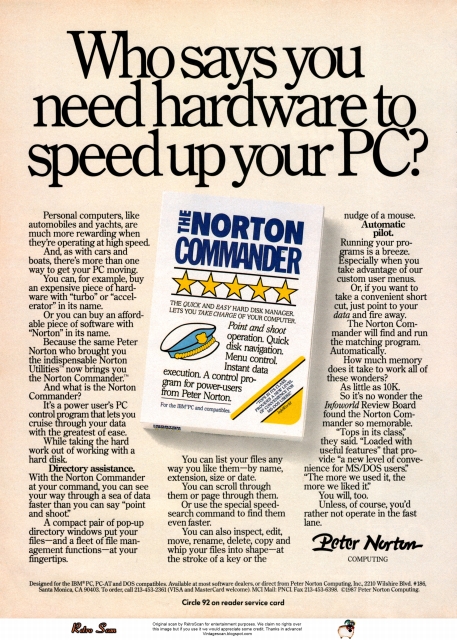
Norton Commander (1987)


Un clic sull'immagine per visualizzarla (e scaricarla) nelle dimensioni originali
Who says you need hardware for speed up your PC?

Personal computers, like automobiles and yachts, are much more rewarding when they’re operating at high speed.
And, as with cars and boats, there’s more than one way to get your PC moving.
You can, for example, buy an expensive piece of hardware with “turbo” or “accelerator" in its name.
Or you can buy an affordable piece of software with “Norton” in its name.
Because the same Peter Norton who brought you the indispensable Norton Utilities™ now brings you the Norton Commander.™
And what is the Norton Commander?
It’s a power user’s PC control program that lets you cruise through your data with the greatest of ease.
While taking the hard work out of working with a hard disk.
Directory assistance. With the Norton Commander at your command, you can see your way through a sea of data faster than you can say “point and shoot”.
A compact pair of pop-up directory windows put your files—and a fleet of file management functions—at your fingertips.
You can list your files any way you like them—by name, extension, size or date.
You can scroll through them or page through them.
Or use the special speed-search command to find them even faster.
You can also inspect, edit, move, rename, delete, copy and whip your files into shape—at the stroke of a key or the nudge of a mouse.
Automatic pilot. Running your programs is a breeze. Especially when you take advantage of our custom user menus.
Or, if you want to take a convenient short cut, just point to your data and fire away.
The Norton Commander will find and run the matching program. Automatically.
How much memory does it take to work all of these wonders?
As little as 10K.
So it’s no wonder the Infoworld Review Board found the Norton Commander so memorable.
“Tops in its class”, they said. “Loaded with useful features” that provide “a new level of convenience for MS/DOS users”.“The more we used it, the more we liked it.”
You will, too.
Unless, of course, you’d rather not operate in the fast lane.
Cioè:
Chi dice che ci vuole dell'hardware per velocizzare il vostro PC?

I personal computer, come le automobili e gli yacht, sono molto più gratificanti quando operano ad alta velocità.
E, come con le automobili e le barche, c'è più di un modo per dare una mossa vostro PC.
È possibile, ad esempio, acquistare un costoso pezzo di hardware che abbia nel nome la parola "turbo" o "acceleratore".
Oppure è possibile acquistare un pezzo di software con prezzo accessibili che abbia "Norton" nel nome.
Perché lo stesso Peter Norton che vi ha dato le indispensabili Norton Utilities ™ ora vi dà il Norton Commander. ™
E cos'è il Norton Commander?
È il programma di controllo del PC di un utente esperto che consente di navigare attraverso i dati con la massima facilità.
Pur accollandosi il difficile compito di lavorare con un disco fisso.
Aiuto con le cartelle. Con il Norton Commander ai vostri comandi, potrete trovare la strada attraverso un mare di dati più velocemente di quanto si possa dire "point and shoot".
Una coppia compatta di finestre di directory pop-up mette i vostri file - e una flotta di funzioni di gestione dei file - a portata di mano.
Potete elencare i file come più vi piace - per nome, estensione, dimensione o data.
È possibile scorrerli rigo per rigo o pagina per pagina.
Oppure utilizzare il comando speciale di ricerca veloce per trovarli ancora più rapidamente.
È inoltre possibile controllare, modificare, spostare, rinominare, eliminare, copiare e rimetterli in riga - con il clic di un tasto o il movimento del mouse.
Pilota automatico. L'esecuzione dei programmi è un gioco da ragazzi. Soprattutto quando si approfitta dei nostri menu utente personalizzati.
O, se volete prendere una comoda scorciatoia, basta puntare ai propri dati e sparare.
Il Comandante Norton troverà ed eseguirà il programma corrispondente. Automaticamente.
Quanta memoria ci vuole per far funzionare tutte queste meraviglie?
Meno di 10K
Quindi non c'è da stupirsi che l'Infoworld Review Board abbia trovato il Norton Commander così memorabile.
"Al vertice nella sua classe", hanno detto. "Ricco di caratteristiche utili" che offrono "nuovi vantaggi agli utenti MS/DOS". "Più lo abbiamo usato, più ci è piaciuto."
Anche per voi sarà così.
A meno che, naturalmente, preferiate non muovervi nella corsia di scorrimento veloce.


venerdì 27 novembre 2009

Norton Antivirus (1991)


Norton Antivirus (1991)
La 'Peter Norton' fu acquistata, nel 1990, dalla Symantec, che continuò a commercializzare le utilities e l'antivirus sviluppati dal famoso Peter, lasciandone il nome alla linea commerciale (che esiste anche adesso).

Il testo dice:

Peter Norton now cures viruses.
Warning. Peter Norton has determined that PC viruses can be hazardous to your data. So to combat the threat, he’s developed the Norton AntiVirus, the only comprehensive virus protection, detection and elimination software for DOS.
The Norton AntiVirus stops viruses dead in their tracks before they infect your system. It also exterminates viruses already living on your hard disk or floppies. And it operates invisibly in the background, alerting you only when a virus is detected.
For protection against new viral strains, just call the 24-hour Virus Newsline. It’s a free service that provides new virus information and easy instructions to keep your virus protection up to date, without the need to upgrade your software.
The Norton AntiVirus is 100% compatible with PC networks like Novell and 3Com. MIS managers can configure and password protect the Norton AntiVirus to meet their corporate needs.
And of course, it’s Windows compatible.
All this protection is yours for only $129 with a 60 day money-back guarantee.
Take it from Peter Norton. If your PC is unprotected, do the right thing:
Pick up a copy of the Norton AntiVirus.
Call for more information.

Cioè:

Peter Norton adesso cura i virus.
Attenzione. Peter Norton ha stabilito che i virus per PC possono essere pericoloso per i dati. Così per combattere la minaccia, ha sviluppato il Norton AntiVirus, l'unico software completo di protezione, rilevamento ed eliminazione di virus per l'ambiente DOS.
Norton AntiVirus blocca definitivamente i virus al loro apparire prima che possano infettare
il vostro sistema. Esso stermina anche i virus che già vivono sul disco rigido o floppy. E opera in modo invisibile in background, avvisando l'utente solo quando viene rilevato un virus.
Per la protezione contro i nuovi ceppi virali, basta chiamare la "Virus Newsline" aperta 24 ore su 24. Questo è un servizio gratuito che fornisce informazioni su nuovi virus e facili istruzioni per mantenere aggiornata la protezione antivirus, senza la necessità di aggiornare il software.
Norton AntiVirus è 100% compatibile con le reti di PC, come Novell e 3Com. I MIS manager possono configurare e proteggere con password Norton AntiVirus per soddisfare le loro esigenze aziendali.
E, naturalmente, è compatibile con Windows.
Tutta questa protezione è vostra per soli 129 dollari, con una garanzia di 60 giorni (soddisfatti o rimborsati)
Prendetelo da Peter Norton. Se il vostro PC non è protetto, fate la cosa giusta:
Prendete una copia di Norton AntiVirus.
Telefonate per ulteriori informazioni.

venerdì 1 maggio 2009

Norton Utilities Advanced Edition (1988)

.
Norton Utilities Advanced Edition (1988)

Impossibile, negli anni '80, lavorare con un PC e non avere le Norton's Utilities e qualcuno degli altri programmi della premiata ditta che aiutavano il DOS ad essere migliore.


Il testo dice:
Now it's not so lonely at the top.
At last.
After five long years alone at the top of the best-seller lists, the Norton Utilities" is being challenged by another software package.
Which is no small feat considering that Version 4.0 is selling even faster than its predecessors did.
Unfair competition.
Of course, in order to compete with the Utilities, this upstart new package first had to copy it.
It had to include the famous UnErase, which has rescued the derrieres of thousands of grateful PC users.
As well as the unique File Info, which lets you attach descriptions of up to 65 characters to your files.
Not to mention the Norton Integrator, which lets you control everything from a single program and gives you on-line help for each function.
In fact, The Advanced Edition of the Norton Utilities includes every single one of the features, functions and enhancements that have made Version 4.0 so popular.
Right down to the user interface which, according to the Info World Review Board makes the Advanced Edition "as easy to use as possible:'
And thats not all.
The more the merrier.
Because the Advanced Edition goes on to include a wish list of brand new technical features and functions.
Like Speed Disk, for tightening up disk space and optimizing access.
And Format Recover, for unformatting your accidentally reformatted hard disk.
As well as a FAT Editor, a Partition Table Editor, a Directory Editor and access to absolute disk sectors.
All of which explains why Info World called the Advanced Edition "a great program that has gotten even better"
We just call it good company.


Cioè:

Ora non è così solo al comando.
Finalmente.
Dopo cinque lunghi anni da solo in testa della lista dei software più venduti, Norton Utilities viene sfidato da un altro software.
Il che non è impresa da poco, considerando che la versione 4.0 sta vendendo anche meglio di quanto facesse quella precedente.
Competizione sleale.
Certamente, per competere con le Utilities, questo presuntuoso nuovo software ha dovuto copiarlo.
Ha dovuto includere il famoso UnErase, che ha salvato i derrières di migliaia di utenti di PC riconoscenti.
Ed anche l'unico File Info che vi permette di aggiungere descrizioni lunghe fino a 65 caratteri ai vostri file.
Per non parlare del Norton Integrator, che vi permette di controllare tutto da un solo programma e vi dà un aiuto on-line per ciascuna funzione.
In effetti, la "Advanced Edition of the Norton Utilities" include ognuna delle caratteristiche, delle funzioni e dei miglioramenti che hanno reso la Versione 4.0 così popolare.
Fino all'interfaccia utente che, secondo le Review Board di Info World rende la Advanced Edition "tanto facile da usare quanto è possibile".
E questo non è tutto.
Più siamo, meglio è.
Perché la Advanced Edition continua, includendo una lista di desiderata di caratteristiche tecniche e di funzioni nuove di zecca.
Come Speed Disk per serrare lo spazio su disco e ottimizzarne l'accesso.
E Format Recover per togliere la formattazione al vostro hard disk se lo avete formattato accidentalmente.
Come un Editor di FAT, un Editor della Tabella delle Partizioni, un Editor di Directory e l'accesso a settori del disco.
Tutto questo spiega perché Info World definisce la Advanced Edition "un gran programma che è diventato addirittura migliore".
Noi diciamo solo che è in buona compagnia.
.

domenica 22 marzo 2009

Norton Guides (1988)

.
Norton's Guide (1988)

Delle Norton Guides mi ero completamente dimenticato; solo il vedere, per caso, questa pubblicità me le ha riportate alla memoria.
Avevo cominciato a giocarci, con questo programma, non tanto per usarlo con i prodotti già pubblicati, manuali in formato di ipertesto, un'idea decisamente nuova, ma per la possibilità di creare io stesso 'prodotti' testuali navigabili contenuti in un unico file. Il tutto con una applicazione TSR (Terminate and Stay Resident), che, una volta caricata, era richiamabile velocemente con un tasto e altrettanto velocemente era possibile far scomparire dal video.
Se una nota Banca avesse finanziato una certa Sovrintendenza ai Beni Artistici, avrei potuto realizzarci la mia prima applicazione: la funzionaria che doveva dirigere il lavoro di restauro era rimasta affascinata dalle NG e avevamo progettato di documentare la storia del monumento e le fasi operative dell'intervento. Purtroppo di soldi non ce ne furono abbastanza e il progetto abortì.
Per i nostalgici ed i curiosi, il software si può trovare in rete, ma bisogna esser dotati di molta pazienza, e si possono anche scaricare alcune realizzazioni, che a guardarle oggi fanno davvero tenerezza. Potreste, ad esempio, consultare l'archivio delle canzoni dei Beatles o quello degli episodi di Star Trek.

Ricordatevi però che tutte le cose belle della vita o fanno ingrassare o fanno male alla salute o sono protette da copyright.


Il testo dice:
Finally. A programming tool for people who hate manual labor.
Nobody ever said programming PCs was supposed to be easy.
But does it have to be tedious and time-consuming, too?
Not any more.
Not since the arrival of the remarkable new program in the lower right-hand corner.
Which is designed to save you most of the time you're currently spending searching through the books and manuals on the shelf above.
The Norton On-Line Programmer's Guides are a quartet of pop-up reference packages that do the same things in four different languages.
Each package consists of two parts: A memory-resident instant access program. And a comprehensive, cross-referenced database crammed with just about everything you need to know to program in your favourite language.
(If you don't believe us, you might want to take a moment or two to examine the data box you just passed.)
You can, of course, find most of this information in the books and manuals on our shelf
But Peter Norton -who's written a few books himself-figured you'd rather have it of your screen.
In seconds.
In either full-screen or moveable half-screen mode.
Popping up right next to your work Right where you need it-
This, you're probably thinking, is precisely the kind of thinking that produced the classic Norton Utilities.
And you're right.
But even Peter Norton can't think of everything.
Which is why there's a built-in compiler for creating databases of your own.
And why all Guides databases are compatible with the instant access program in your original package.
So you can add more languages without spending a lot more money.
To get more information, call your dealer. Or call Peter Norton at 1-800-451-0303 Ext. 40.
And ask for some guidance.
Cioè:
Finalmente. Uno strumento di programmazione per la gente che odia il lavoro (col) manuale.
Nessuno ha mai detto che sia facile programmare i PC.
Ma deve anche essere noioso e far perder tempo?
Non più.
Non dall’arrivo del nuovo notevole programma nell’angolo in basso a destra.
Disegnato per farti risparmiare la maggior parte del tempo che passi cercando tra libri e manuali sullo scaffale lì sopra.
Le Guide On-Line del Programmatore di Norton sono un quartetto di programmi di riferimento pop-up che fanno la stessa cosa con quattro linguaggi diversi.
Ogni pacchetto software è composto di due parti: un programma residente in memoria, ad accesso istantaneo, e un database a riferimenti incrociati pieno zeppo di quasi tutto quello che hai bisogno di sapere per programmare nel tuo linguaggio preferito.
(Se non ci credi, potresti prendere qualche istante per esaminare i dati nel riquadro che ti sei appena lasciato dietro).
Certamente puoi trovare la maggior parte di queste informazioni nei libri e nei manuali sul tuo scaffale.
Ma Peter Norton – qualche libro l’ha scritto anche lui – ha pensato che avresti piuttosto potuti averle sullo schermo.
In pochi secondi.
Sia a tutto schermo che su una metà, riposizionabile.
Pronto a comparire proprio accanto al tuo lavoro.
Proprio dove ne hai bisogno.
Questo, starai probabilmente pensando, è precisamente il tipo di considerazioni che hanno prodotto le classiche Norton Utilities.
E hai ragione.
Ma neppure Peter Norton può pensare a tutto.
Ed è per questo che c’è incorporato un compilatore per creare i tuoi database.
E perché tutti i database delle Guide sono compatibili con il programma ad accesso istantaneo del pacchetto originale.
Così che puoi aggiungere altri linguaggi senza spendere molto di più.
Per avere ulteriori informazioni, chiama il tuo rivenditore. O chiama Peter Norton al 1-800-451-0303 Ext. 40.
E chiedi qualche consiglio

.
_____________________________________


Disclaimer


Vintage ads are shown here in fair use context. Every image is © by its original company or artist. This site does not endorse any advertisement.